Compliance Corner: Navigating the Regulatory Realm |
|
Recent EPA Enforcement: A Case for AQMIS
Region 1: CAA 112(r) – 2 actions related to anhydrous ammonia releases at food processing related facilities including deficient records.
Region 2: One action included RCRA air emissions violations associated with leaking equipment. Another action included industrial wastewater discharges to a river.
Region 6: One RCRA action related to the storage and handling of hazardous waste including records compliance.
AQMIS can be expanded beyond emissions inventory and air quality monitoring data management to include the management of environmental and safety related facility maintenance, waste management, and water quality monitoring records.
Contact our Sales Team today to learn more about how our software solutions simplify environmental compliance across all regulatory programs, not just CAA related.
|
|
Lakes Environmental has Moved! |
Lakes Environmental is pleased to announce that we have relocated our Waterloo office.
You can now find us at our new address:
445 Wes Graham Way, Unit 203
Waterloo, Ontario,
N2L 6R2, Canada
Our new space keeps us close to the heart of Waterloo’s innovation community, while continuing to support our team and day-to-day operations.
|
|
Online AERMOD Training Course – May 12-13, 2026 |
 |
Register today for our next available 2-day online AERMOD course taking place on May 12 and 13, 2026 from 8:30am to 5:00pm (Central Time – Chicago, USA).
Register today before space is gone!
Note: Due to the immense popularity of our online courses and small class sizes, we recommend registering and making payment as soon as possible to reserve your spot.
|
|
Online CALPUFF Course – May 19-20, 2026 - Spots Filling Fast! |
 |
Our next available 2-day online CALPUFF course is filling up quickly. Join us on May 19 and 20, 2026 from 8:30am to 5:00pm (Central Time – Chicago).
Secure your spot by registering today!
|
|
|
Lakes Environmental Closed for Good Friday Holiday |
Lakes Environmental's offices will be closed on Friday, April 3, 2026, to observe the Good Friday holiday. If you have any needs during that time, please e-mail us at support@webLakes.com and we will contact you on Monday, April 6, 2026, when our offices reopen.
|
|
UPCOMING TRAINING COURSES |
|

|
MODELING TIP |
Modeling Inert Gases with CALRoads View |
|
CALRoads View is an air dispersion modeling package used to predict air quality impacts near roadways from both moving and idling vehicles. Three dispersion models are integrated into the application: CALINE4, CAL3QHC, & CAL3QHCR. The original design of these models accounted only for releases of particulate matter (PM), carbon monoxide (CO), or nitrogen dioxide (NO2) with no further support for other inert gases.
This restriction is a by-product of the model code which uses hard-coded values of molecular weight for CO & NO2 to print output concentrations in parts per million (PPM) instead of the more common micrograms per cubic meter (µg/m3). In order to calculate the correct volume, the model uses the hard-coded molecular weight to convert the calculated amounts with the below equation:
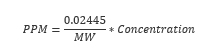
Where: MW = molecular weight [g/mol] and Concentration is given in µg/m3
To expand the models’ capabilities beyond these original pollutants, CALRoads View includes a custom Inert Gases pollutant type with a user-specified Molecular Weight definition. To utilize this feature, follow the steps below.
- Open the Job Options window.

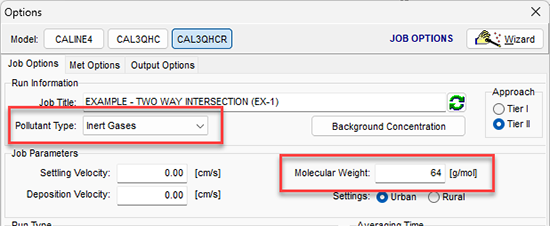
- The options to change are all located on the Job Options tab of the Options window. First, change the Pollutant Type to Inert Gases.
- The Molecular Weight input in the Job Parameters group will switch from a hard coded value to a user input text field. The example below uses a value of 64 representing SO2 as the pollutant type.
- Run the model.
The model output will now print values in PPM that reflect the correct molecular weight of alternate pollutants.
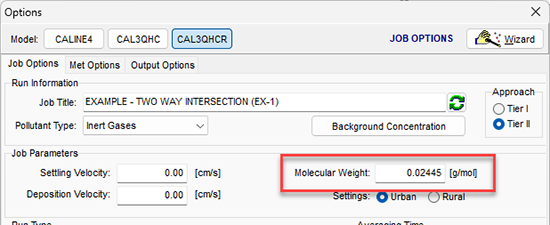
The same option can also be used to report inert gas concentrations in micrograms per cubic meter instead of parts per million. By setting the Molecular Weight to 0.02445, the modeled concentrations remain as their original values. CALRoads View users can then edit the labeling of their contour plots to display the new µg/m3 units.
After running the model with that selection, go to the Graphical Options and select the Contours | Color Ramp settings. Change the Label Unit to µg/m3 to reflect the new data units.
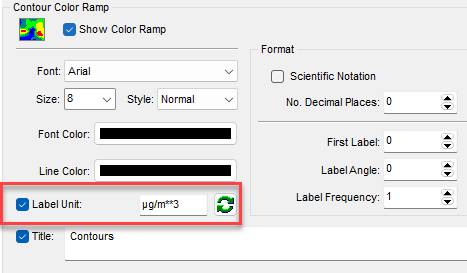
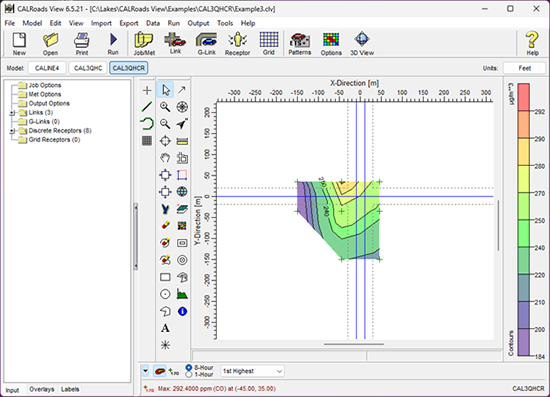
Note that the model output file will still indicate that the results are in ppm, so take care when reviewing the text output.
|
|

|
ENVIRONMENTAL NEWS ARTICLES |
Canadian Drinking Water at Risk Long After Wildfires, UBC Study Warns |
March 6, 2026 - Canada’s drinking water can remain at risk long after wildfires burn out, according to a UBC-led global review that found water-quality impacts often emerge months or years later—not just immediately after a fire.
Read more → |
|
Climate Change Pushes Tropical Insects to Their Heat Limit |
March 4, 2026 - Up to half of the insects in the Amazon region could be exposed to life-threatening heat levels due to progressive, anthropogenic global warming. This is shown by a recent study by the universities of Würzburg and Bremen.
Read more → |
|
|
|
UPCOMING CONFERENCES |
2026 Conference Schedule |
|
TCEQ Environmental Trade Fair and Conference (ETFC)
May 19-20, 2026 | San Antonio, TX | Booth #522
Learn more →
Air & Waste Management Association’s 119th Annual Conference & Exhibition
Jun 21-24, 2026 | Austin, TX | Booth #401
Learn more →
|
|
|
LAKES SOFTWARE GROUP OF COMPANIES
|
 |
1-170 Columbia St. W.
Waterloo, ON N2L 3L3
View Online
This newsletter contains information gleaned from various sources on the web, with complete links
to the sources cited. Organizations cited are in no way affiliated with Lakes Environmental Software.
For more information, please visit our web site at: www.webLakes.com.
All comments and suggestions are welcome. You can e-mail us at: support@webLakes.com.
Privacy Policy |
|
| | |