Compliance Corner: Navigating the Regulatory Realm |
|
EPA Region 9 Announces Two Landfill Gas Enforcement Settlements
One landfill agreed to pay a penalty of $215,000 US for illegally venting and mismanaging treated landfill gas. The other landfill agreed to a penalty of $196,936 US for failing to properly collect landfill gas during construction activities.
EPA New Source Performance Standards (NSPS) require landfills to collect gas that results from the biodegradation of solid waste in landfills, and to either treat the gas with a control device (such as a flare) or to route the collected gas to a treatment system that processes the gas for subsequent sale or beneficial use. Venting of treated landfill gas to the ambient air is not allowed.
Demonstration of compliance is made by measuring gas flow rates and the quality of the gas before and after it is treated or processed. Large amounts of data are generated which must be managed to properly operate the emission control systems, perform emission calculations, and file required reports with regulatory agencies.
Our Ambient Quality Management Information System, AQMIS, is the perfect solution for managing and reporting data related to landfill gas compliance. Process data can be ingested into the system using an Application Programming Interface (API). Additionally, implementation of the air modeling module can help operators manage site operations to address odor complaint issues.
Contact us today to learn more about how AQMIS can be used to resolve your air quality compliance data management and reporting responsibilities!
|
|
|
Online AERMOD Course – June 16-17, 2026 - Only 2 Spots Left! |
 |
Register today for our next available 2-day online AERMOD course taking place on June 16 and 17, 2026 from 8:30am to 5:00pm (Central Time – Chicago, USA).
Register today before space is gone!
Note: Due to the immense popularity of our online courses and small class sizes, we recommend registering and making payment as soon as possible to reserve your spot.
|
|
Congratulations! AERMOD View Draw Winner - CPANS Annual Conference |
Lakes Environmental was a proud gold sponsor at this year’s CPANS Annual Conference held on May 20, 2026. During the event, we hosted a draw for a FREE 1-year license of our AERMOD View air dispersion modeling software!
We’re pleased to announce our winner:
Mohammad Lotfi from the University of Alberta
Congratulations Mohammad! We hope you enjoy using AERMOD View and look forward to supporting your modeling work.
|
|
A&WMA Annual Conference and Exhibition |
|
|
|
Online CALPUFF Course – September 29-30, 2026 |
 |
Enhance your air dispersion modeling skills by registering for our 2-day online CALPUFF course taking place on September 29 and 30, 2026 from 8:30am to 5:00pm (Central Time – Chicago).
Led by our expert instructors, this course offers in-depth instruction and hands-on exercises designed to help you effectively apply the CALPUFF modeling system in real-world scenarios.
Registration is now open – secure your spot today!
|
|
UPCOMING TRAINING COURSES |
|

|
MODELING TIP |
|
|

|
ENVIRONMENTAL NEWS ARTICLES |
A New Study Explains How Carbon Dioxide Cools the Upper Atmosphere—and Warms Earth Below |
May 20, 2026 - Even as temperatures rise on Earth’s surface and in the lower atmosphere, the planet’s upper atmosphere has cooled dramatically. This paradoxical pattern is a well-known sign of humanity’s climate impacts—but until now, the underlying physics has remained a mystery.
Read more → |
|
Extreme Weather Events Accelerating Tidal Wetland Loss |
May 19, 2026 - Tidal wetlands are critical, yet vulnerable ecosystems. Tidal marshes, mangrove forests, and tidal flats support biodiversity, protect against flooding and storm surges, sequester carbon, and improve water quality.
Read more → |
|
|
|
UPCOMING CONFERENCES |
2026 Conference Schedule |
|
Air & Waste Management Association’s 119th Annual Conference & Exhibition
Jun 21-24, 2026 | Austin, TX | Booth #401
Learn more →
|
|
|
LAKES SOFTWARE GROUP OF COMPANIES
|
 |
445 Wes Graham Way, Unit 203,
Waterloo, ON N2L 6R2
View Online
This newsletter contains information gleaned from various sources on the web, with complete links
to the sources cited. Organizations cited are in no way affiliated with Lakes Environmental Software.
For more information, please visit our web site at: www.webLakes.com.
All comments and suggestions are welcome. You can e-mail us at: support@webLakes.com.
Privacy Policy |
|
| | |

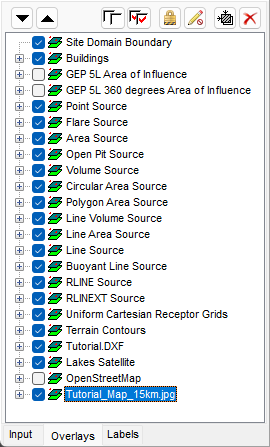
 allow users to quickly shift layers up or down for better visibility in the main display. Layers can also be reordered by selecting the layer name and dragging it up or down as desired.
 and Check All
  options give users the ability to quickly manage all listed layers for hiding or viewing.
 gives the user the ability to prevent the selected layer from being selected in the drawing area. This is especially useful for large base maps which the user may never want to edit or otherwise select while working with model objects. A layer that has been disabled from selection will have a lock icon displayed
 prevents the selected layer from being moved, resized, or deleted. The layer or object can still be selected in the drawing area so that it can be edited but it is locked to the drawing area graphically.
 allows you to quickly zoom in on the selected layer. This can be helpful in locating specific model objects or map layers.
 to quickly remove the selected layer.