Compliance Corner: Navigating the Regulatory Realm |
| Brazil Connects the Pieces of Air Quality Management
Brazil has taken an important step toward more integrated air quality management. Building upon the National Air Quality Policy established by Law No. 14,850 of 2024, CONAMA Resolution No. 513, published in April 2026, restructures Brazil’s National Air Quality Control Program, known as PRONAR.
The resolution connects activities that are often managed separately, including emissions inventories, ambient monitoring, atmospheric modeling, environmental permitting and public reporting. Among other requirements, environmental agencies must periodically prepare emissions inventories, publish annual air quality reports and develop management plans identifying priority regions, principal emission sources, control measures, goals and implementation schedules.
Brazil’s states will begin this process from different starting points. Some already operate substantial monitoring and emissions-data systems. At least one Brazilian state has published an Atmospheric Emissions Control Plan, for example, which describes an online system through which facilities report information about emission sources, fuels, operating conditions and pollutants. The plan also calls for integrating emissions information with environmental licensing, expanding the monitoring network and connecting state monitoring data to Brazil’s National Air Quality Management System (Sistema Nacional de Gestão da Qualidade do Ar), known as MonitorAr.
The resolution demonstrates the value of connecting emissions inventories, monitoring data, permitting records and modeling results within a common information system. Lakes Environmental Software’s Ambient Quality Management Information System, AQMIS, is designed to integrate these functions while supporting data quality, regulatory reporting and informed air quality planning. AQMIS can be configured to provide seamless integration with MonitorAr. Industrial entities which must comply with state and national requirements can use AQMIS programs specific to their facilities to manage their compliance obligations. Contact Lakes Environmental today to learn how AQMIS can help your organization comply with air quality regulatory requirements in any location around the world.
Sources: CONAMA Resolution No. 513/2026 and Paraná’s 2024–2026 Atmospheric Emissions Control Plan.
|
Considering a Switch to AERMOD View? |
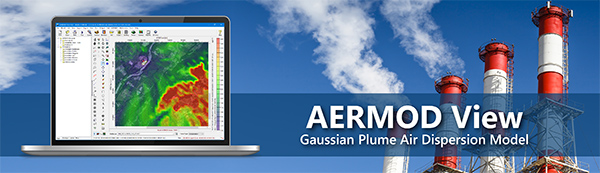 |
Discover the advantages of an all-in-one AERMOD modeling solution.
AERMOD View delivers powerful modeling capabilities in one package:
- Integrated meteorological and terrain preprocessing
- Parallel processing
- Built-in GIS and mapping tools
- Advanced results analysis and 3D visualization
No additional modules required!
Plus, take advantage of special competitive pricing and hands-on training for new and experienced modelers.
Explore Your Options with AERMOD View
|
|
|
A&WMA “Guideline on Air Quality Models: From Guidance to Practice” Conference Wrap-Up |
 |
|
Earlier this month, Lakes was proud to be an Impact Sponsor for the Air & Waste Management’s 11th Specialty Conference on issues related to the Guideline on Air Quality Models. The conference was sponsored by the A&WMA Technical Coordinating Committee for Atmospheric Modeling and Meteorology (APM) and was held October 13-15, 2026 at the Hilton Durham near Duke University Hotel in Durham, North Carolina. Over 115 people attended, and we enjoyed meeting the attendees!
|
Lakes’ Senior Meteorologist, Michael Hammer, served as the General Conference Chair and attended alongside our Head of US Operations, David Weeks. Michael also gave a presentation on behalf of Lakes Software – CALPUFF Modeling System: Modernization and Enhancements – which covered some of the development activities that Lakes has performed since acquiring the CALPUFF modeling system in 2024.
The conference featured an opening keynote plenary session with staff from the U.S. Environmental Protection Agency, Office of State Air Partnerships who offered updates on the latest developments in regulatory air modeling. This was followed by 35 technical presentations covering a wide range of topics such as meteorological data processing, recent AERMOD development studies, unique emissions and source characterization issues, alternative modeling techniques, and more.
If you missed us at this conference, we hope to see you at future events including the A&WMA 120th Annual Conference and Exhibition taking place June 28 – July 1, 2027 in Long Beach, California!
|
|
Online AERMOD Course – January 19-20, 2027 |
 |
Register today for our next available 2-day online AERMOD course taking place on January 19 and 20, 2027 from 8:30am to 5:00pm (Central Time – Chicago, USA).
Don't miss out! Register today before space is gone!
Note: Due to the immense popularity of our online courses and small class sizes, we recommend registering and making payment as soon as possible to reserve your spot.
|
|
UPCOMING TRAINING COURSES |
|

|
MODELING TIP |
Import Existing Model Data in AERMOD View |
|
AERMOD View has many useful features that make building new projects intuitive and simple. But what about existing model files built with other proprietary software? AERMOD View has you covered there, too!
When you start a new project in AERMOD View, the New Project Wizard lets you choose where to store project files, define the project’s map projection settings, and set domain extents. Normally, modelers will start a brand-new project, but you can use an existing AERMOD model input file as a template. You can also include building data and contour plot files in this process to import a full project.
Follow the steps below to import your existing AERMOD model data into AERMOD View
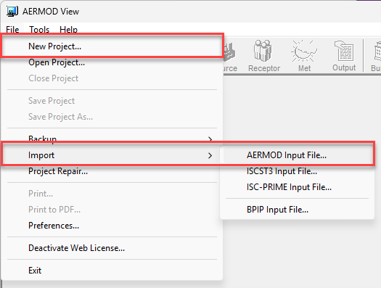
Step 1: Start a new project in AERMOD View. There are multiple ways to do this including:
- Select the New button on the main toolbar
- Use the File | New Project menu selection, or
- Select File | Import | AERMOD Input File
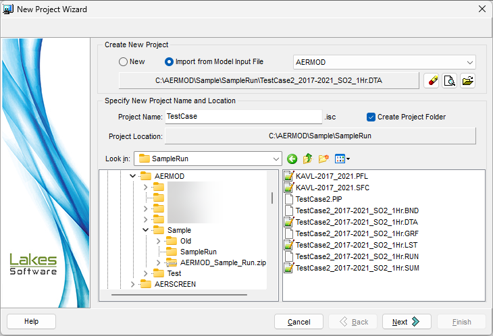
Step 2: In Step 1 of the New Project Wizard, identify the existing model input file to use as your template.

Step 3: Continue assigning the required project data such as the project name and location where it will live on your computer. By default, the new project will be saved into its own folder to make file management easier.
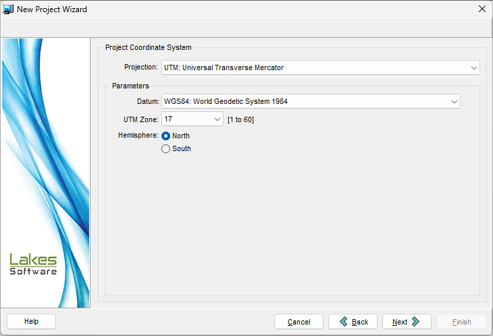
Step 4: In Step 2 of the Wizard, define your Project Coordinate System settings. AERMOD View will automatically read this information if included in the model input file. Otherwise, you can select from the available options.
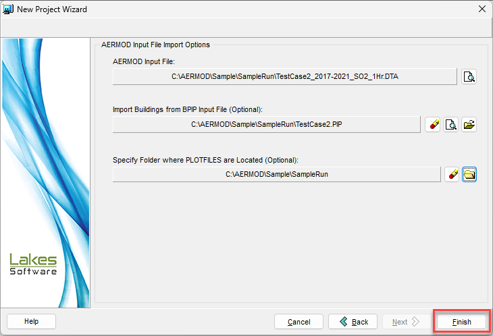
Step 5: The last step allows you to complete your new AERMOD View project by importing building data from existing BPIP input files as well as contour plot files from the original project.
Click the Finish button to generate the new AERMOD View project.
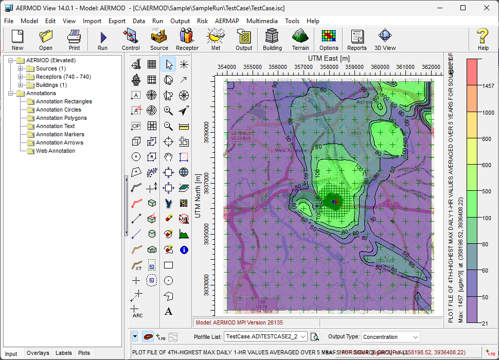
You’ll now see the imported project data immediately in AERMOD View’s display.
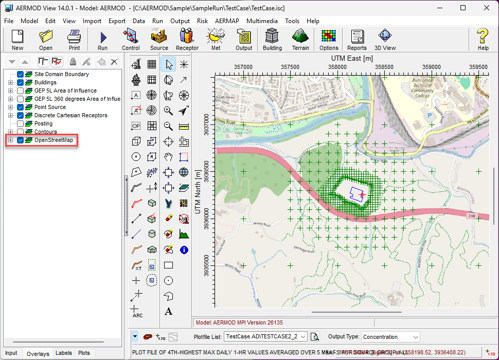
In addition to all project information, AERMOD View will also automatically import the OpenStreetMaps Tile Maps data for your project providing additional graphical context to the model data.
If you have more questions about transitioning projects to AERMOD View, please contact our Technical Support team and they’ll be happy to assist!
|
|

|
ENVIRONMENTAL NEWS ARTICLES |
How Climate Change, New Technology Are Shaping the Future of Extremes in Peak Power Demands |
October 27, 2026 - New research led by the University of Michigan provides utilities and policymakers with forecasts that can help them better prepare for future extremes in peak energy demand in the United States.
Read more → |
|
Warning on Quality of Rainwater |
October 7, 2026 - Rainwater tanks are a popular way for Australians to save water, but new research has found they can also harbour potentially harmful bacteria and metals that could pose health concerns.
Read more → |
|
|
|
LAKES SOFTWARE GROUP OF COMPANIES
|
 |
445 Wes Graham Way, Unit 203,
Waterloo, ON N2L 6R2
View Online
This newsletter contains information gleaned from various sources on the web, with complete links
to the sources cited. Organizations cited are in no way affiliated with Lakes Environmental Software.
For more information, please visit our web site at: www.webLakes.com.
All comments and suggestions are welcome. You can e-mail us at: support@webLakes.com.
Privacy Policy |
|
| | |