Compliance Corner: Navigating the Regulatory Realm |
| EU Clarifies Methane Import Requirements: No Immediate Penalties Does Not Mean No Compliance Obligation
In the October 2025 Compliance Corner, we discussed how European Union Regulation 2024/1787 could affect U.S. producers supplying crude oil and natural gas to the European market. With key requirements scheduled to take effect on January 1, 2027, the European Commission has now issued two recommendations intended to clarify how importers and their suppliers can demonstrate compliance.
The first recommendation provides optional model contract clauses that importers can incorporate into contracts for crude oil, natural gas, liquefied natural gas, and coal. The clauses require importers to demonstrate that the supplied energy was produced under methane monitoring, reporting, and verification-or MRV-measures equivalent to those required by the EU regulation.
The second recommendation addresses penalties. Because of uncertainty in global energy markets, the Commission recommended that EU Member States not apply certain penalties for importer violations associated with obligations due during 2027, 2028, and 2029, except in cases involving fraudulent breaches. However, this recommendation does not postpone or eliminate the underlying compliance requirements. Importers must continue working toward compliance, and Member States are expected to actively monitor and encourage that progress.
This distinction is important for U.S. oil and gas producers. European importers will need reliable information from their suppliers to demonstrate compliance. Producers that wait until penalties are actively imposed may find themselves unable to provide the information required by existing or prospective European customers.
Lakes Environmental Software’s Ambient Quality Management Information System, AQMIS, can provide a centralized platform for organizing the producer, facility, and emission-unit-level information needed to support these requirements. Contact our team of experts today to learn how AQMIS can help your organization prepare for the EU methane-import requirements.
Sources: Commission Recommendation (EU) 2026/1834 on optional model clauses and Commission Recommendation (EU) 2026/1835 on the application of penalties.
|
|
|
Online AERMOD Course – October 20-21, 2026 - Filing Quickly! |
 |
Register today for our next available 2-day online AERMOD course taking place on October 20 and 21, 2026 from 8:30am to 5:00pm (Central Time – Chicago, USA).
Don't miss out! Register today!
Note: Due to the immense popularity of our online courses and small class sizes, we recommend registering and making payment as soon as possible to reserve your spot.
|
|
Online CALPUFF Course – September 29-30, 2026 - A Few Spots Left! |
 |
Enhance your air dispersion modeling skills by registering for our 2-day online CALPUFF course taking place on September 29 and 30, 2026 from 8:30am to 5:00pm (Central Time – Chicago).
Led by our expert instructors, this course offers in-depth instruction and hands-on exercises designed to help you effectively apply the CALPUFF modeling system in real-world scenarios.
Register now before sopace is gone!
|
|
Lakes Environmental Closed for Labour Day Holiday |
Lakes Environmental will be closed on Monday, September 7, 2026, to observe the Labour Day holiday. If you have any needs during that time, please e-mail us at support@webLakes.com and we contact you on Tuesday, September 8, 2026 when our office reopens.
|
|
UPCOMING TRAINING COURSES |
|

|
MODELING TIP |
Working with the Plots Tab in AERMOD View |
|
In a previous modeling tip, we provided an overview of working with layers within Lakes Environmental Software products. In the popular AERMOD View application, the Plots tab lists all available contour plot output files for display and analysis.
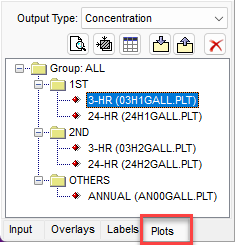
Plots Tree View
The Plots tab contains several functions to assist users in visualizing and analyzing data.
- View as Text
 opens the selected Plot file in the system’s default text editor. Note that you can change the default editor via the Preferences menu. opens the selected Plot file in the system’s default text editor. Note that you can change the default editor via the Preferences menu.
- Zoom to Plot File
 quickly zooms to the full extents of the selected Plot file. This allows the user to easily zoom in or out to the plot’s extents without having to switch to the Overlays tab. quickly zooms to the full extents of the selected Plot file. This allows the user to easily zoom in or out to the plot’s extents without having to switch to the Overlays tab.
- View as Grid
 opens the selected Plot file in the Plot File Grid View dialog. As discussed in a previous modeling tip, this feature creates a full tabular view of the Plot file data and allows for exporting to Excel. opens the selected Plot file in the Plot File Grid View dialog. As discussed in a previous modeling tip, this feature creates a full tabular view of the Plot file data and allows for exporting to Excel.
- Import Plot File / Export to CSV
 provides modelers with the means to quickly import existing Plot files or export selected Plot files to CSV format for further analysis. provides modelers with the means to quickly import existing Plot files or export selected Plot files to CSV format for further analysis.
- Delete Selected
 removes the selected Plot file or files from the drawing area. The Plot file is deleted from the project entirely. To delete multiple files, hold the Ctrl key while selecting the plots to be removed. removes the selected Plot file or files from the drawing area. The Plot file is deleted from the project entirely. To delete multiple files, hold the Ctrl key while selecting the plots to be removed.
You can also right-click with the mouse on any of the Plot files in the tab to display a context menu with the following options:
- Delete Results – Deletes the selected file from the project
- View Results – Opens the Plot File Grid View
- Save As – Saves the selected Plot file under a different name and/or location
- Select All in Group – Selects multiple Plot files within a single folder
- Select All – Selects all Plot files in a project
- Unselect All – Unselects any selected Plot files
Selecting multiple Plot files in the tab via the Ctrl key also allows users to apply one set of Graphical Options to multiple files at once. This can save valuable time when making edits to a project.
|
|

|
ENVIRONMENTAL NEWS ARTICLES |
UNM Researchers Study Permafrost Thaw, Water Quality and Carbon Cycling in Alaska |
August 18, 2026 - A University of New Mexico research team spent several weeks in northern Alaska this summer studying how permafrost thaw may be changing water quality and the movement of carbon through Arctic watersheds.
Read more → |
|
Natural Restoration Is Key to Reviving Threatened Tropical Rainforests |
August 24, 2026 - As nations race to restore ecosystems and curb climate change, research has shown that letting nature do the work is a cost-effective and viable solution.
Read more → |
|
|
|
LAKES SOFTWARE GROUP OF COMPANIES
|
 |
445 Wes Graham Way, Unit 203,
Waterloo, ON N2L 6R2
View Online
This newsletter contains information gleaned from various sources on the web, with complete links
to the sources cited. Organizations cited are in no way affiliated with Lakes Environmental Software.
For more information, please visit our web site at: www.webLakes.com.
All comments and suggestions are welcome. You can e-mail us at: support@webLakes.com.
Privacy Policy |
|
| | |